BULK FOOD OPERATIONS · INFORMATION LABELS
A label can look right and still fail as a temporary record. Confirm what staff will write, with which pen, and what must remain readable through checkout.
Choose a label-and-pen combination, not just a finish name
For a bulk-food container, “writable” needs to mean more than a pen leaving a mark. The required information must fit, remain legible during the intended use and stay associated with the correct container. If the label must come off afterward, that is another requirement to verify.
Start with the actual recording task. A decorative label and a temporary tare record may need different layouts, materials or handling. Your existing plain recording label may already be the better choice.

“Matte” is a useful starting description, not a universal pen recommendation
Manufacturer guidance shows why the product range matters. Avery’s general handwriting advice lists several writing tools for particular label types. Its separate WePrint handwriting guidance gives different recommendations, including restrictions on gel and rollerball pens and a need to let writing dry.
Those instructions concern Avery’s products. They do not validate a DecentCustom label or establish one rule for every material described as matte. Read the guidance for the exact stock, finish and printed configuration you are considering, then check it with the tools staff actually use.
Keep handwriting compatibility separate from printer compatibility. A surface accepting a marker does not establish that a finished custom sheet can be run through a particular office printer. If machine printing is part of the plan, obtain the appropriate compatibility information before using it.
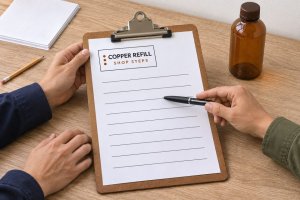
A filled requirements brief for a temporary bulk record
Fictional planning example: Alder Bulk wants to compare its ordinary recording labels with a custom printed layout. The following describes the intended use, not observed performance or an approved purchase.
- Information
- Tare value, its unit and the current item code. First define the tare, unit and item-code record with the bulk and checkout teams.
- Writing tools to assess
- The actual ballpoint pen and capped permanent marker used by the team. Keep each specific tool identifiable in the review.
- Intended setting
- A dry indoor recording point and the ordinary route to checkout. Damp or chilled-container use is outside this initial brief.
- Reading requirement
- A checkout employee can read the complete record and match it to the correct container without guessing.
- Layout requirement
- Separate, clearly named fields with enough white space for the store’s actual values and item-code format.
- Removal requirement
- Not yet settled. Ask whether the label should remain or be removed, and how that fits the container’s actual reuse process.
- Current decision
- Keep the existing suitable recording arrangement while the candidate’s material, pen compatibility and removal requirements are checked.
This brief exposes a useful gap: selecting a matte face stock does not answer the removal question. Settle that requirement before treating a candidate as ready to order.
Record what a sample actually does
Review the final intended printed configuration with the actual writing tool and the actual accepted surface. A blank material swatch may not represent a heavily printed or coated writing area. Keep ordinary existing labels in the comparison.
- Identify the combination. Record stock, finish, print coverage, label size, writing tool and intended surface. Avoid a result labelled only “matte worked.”
- Write the required record. Include the longest values and item codes the real service needs. Inspect skips, spreading and whether the fields leave enough space.
- Allow the specified drying conditions. Follow the relevant supplier guidance and record the actual interval used. Do not borrow a drying time from another brand or range.
- Review ordinary handling and reading. Check whether the record remains clear through the intended route and whether the checkout team can interpret it. Describe a smear or unreadable field precisely rather than marking the whole format “good.”
- Check the separate end-of-use requirement. If removal matters, assess it on the actual surface using the appropriate approved process. Easy writing does not prove easy removal.
No physical sample was tested for this guide. The list defines observations to obtain; it is not a claim that either pictured tool has passed on the linked product. If you cannot establish the needed performance, retain a suitable existing format or seek a better-supported candidate.
If the intended use later includes condensation, wet handling or cleaning, reopen the material requirements. A dry indoor review does not cover those conditions, and it does not establish food-contact suitability.
Keep the changing information larger than the decorative detail
Put the stable store name in a modest header and leave the variable fields open. A large logo should not force staff to squeeze the weight unit into a corner or write an item code over background graphics.
For an editorial layout review, use clearly fictional values such as Tare: 250; Unit: g; Item: 042. These are sample strings for judging field space, not a real product code or measured container weight. Then replace them with the longest formats your own service actually uses before approving the artwork.
Review the proof at its intended physical size. A large screen preview can make a small writing line look generous. Ask the people who write and read the record to assess the layout, and preserve their specific feedback with the version.
Keep old or conflicting item information out of the active recording area. Changing the artwork does not correct a stale code already associated with a container; that needs the store’s actual information process.
Compare the listed options with the brief
Browse custom labels and stickers after defining the job. Keep the material, finish, dimensions and intended writing method together rather than approving only a picture.
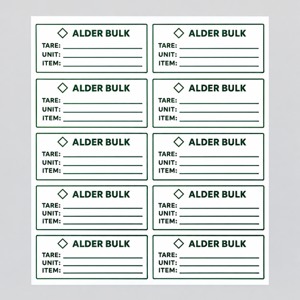
Custom information-label layout to evaluate
The current custom product labels page offers material and finish choices. It describes white paper for indoor, dry use and describes the matte finish as suitable for writing. That listing does not establish the performance of your selected pen on the final printed layout.
Confirm the exact configuration, labels per ordering unit and any removal or contact requirements. The default quantity is not a verified count of individual labels. The AI sheet count and writable fields are illustrative; no ink, adhesive or food-contact result is claimed. Click the image for the actual product.
Approve evidence for the intended use
Keep the checked record fields, final artwork, actual material-and-pen observations and unresolved conditions together. Use a suitable existing label while a new candidate remains unverified. When the brief supports a custom format, compare the configuration at DecentCustom before approving the order.