Supermarket service communication
Match the ready message, arrival instruction and counter sign to the handoff customers will actually use.
Write supermarket pickup instructions around the collection method first, then explain the steps that depend on the ordering channel. A website order and a telephone order may go to the same staffed counter. Two orders placed through the same app may use different collection methods.
That distinction changes what belongs in a message. The location tells customers where to go; the channel tells them which confirmation, arrival control or support route to use. A generic “Pickup” sign supplies neither on its own.
Use the example below to produce three things that agree: a channel-to-handoff record, a ready notification and the instruction at the collection point.
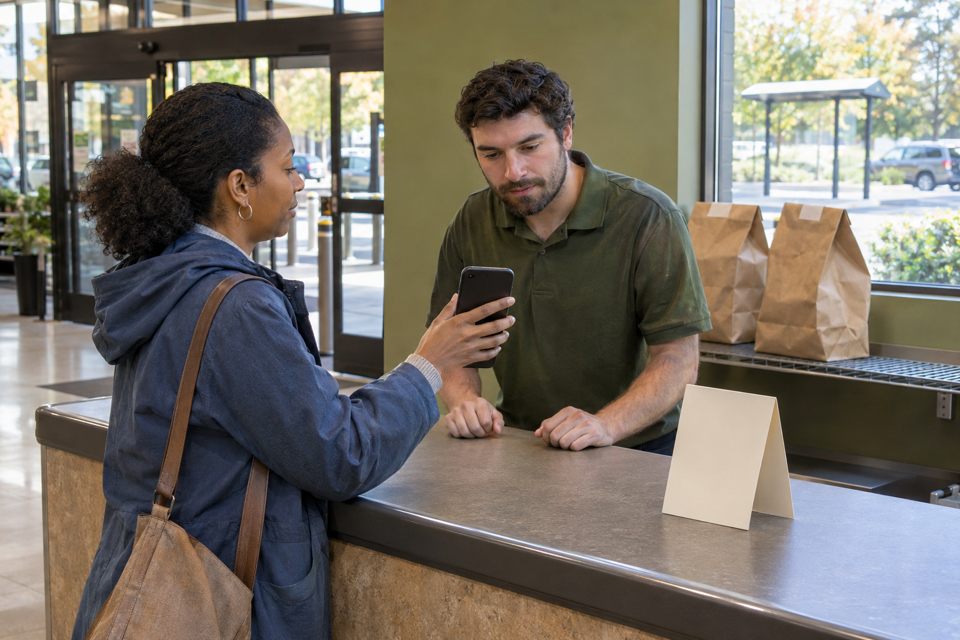
Separate “how they ordered” from “where they collect”
Start with the services your store actually offers. For each one, open a current confirmation with personal information removed and trace the next step. Record the location, arrival action and responsible team together.
Instacart’s pickup-flow documentation distinguishes curbside, in-store and locker instructions. It also notes that arrival reporting affects the pickup flow. This supports separating the physical handoff from the ordering interface; it does not mean your store offers all three methods.
| Record this | The question it answers | A useful entry contains |
|---|---|---|
| Ordering channel | Where did this order originate? | The store website, named platform or telephone service—not simply “online.” |
| Collection method and location | Where does the customer go? | The actual counter, designated pickup area or supported locker location. |
| Ready signal | When should the customer act? | The notification or call that establishes readiness for that service. |
| Arrival and matching step | How does the team know the customer is here? | The real arrival control or staff contact, plus the order reference or record the service uses. |
| Help owner | Who handles an exception? | A working store or platform route appropriate to the problem. |
Do not assume the team answering a store telephone can resolve every platform payment or order-editing problem. Separate arrival help from order support when different parties handle them.
A filled example: two ordering channels, one pickup desk
Illustrative setup: an independent supermarket accepts website and telephone preorders. Both are collected from a staffed pickup desk inside the main entrance. Website customers receive a ready message; staff call telephone customers when their order is ready and provide a reference. These are planning assumptions, not a report of a retailer’s tested system.
| Channel | Ready signal and first action | At the same desk |
|---|---|---|
| Store website | Read the ready message, then come to the pickup desk inside the main entrance. | Have the reference from the confirmation available. Staff follow the store’s order-matching procedure. |
| Telephone | Wait for the agreed ready call. Staff give the reference and the same pickup location. | Tell the employee the order reference. No website login or app check-in is required in this example. |
Website ready message
Draft for the example service
Your order is ready for collection.
Come to the pickup desk inside the main entrance.
Have your order reference ready when you speak to a team member.
Cannot find the reference? Ask us at the pickup desk.
Telephone ready-call wording
Your order is ready. Please collect it from the pickup desk inside the main entrance. Your order reference is [the reference assigned to this order]. Give that reference to a team member at the desk.
The reference is the variable detail; the location and first action stay consistent. Use the real reference from the store’s record. Do not invent a reference format simply to match a printed design.
The shared counter message
PICKUP ORDERS
Start here.
Have your order reference ready.
This wording covers both channels in the example. “Show your app confirmation” would exclude the telephone customer who has no app confirmation. If your real service uses a different matching method, change the message and the staff record together.
A reference helps staff find an order; it does not replace the store’s existing verification and release procedure. Keep private customer details in the appropriate order record rather than on the general counter sign.
For curbside pickup, specify arrival and its fallback
A curbside route needs information the indoor example does not: where to park and how to report arrival. Publix’s curbside FAQ describes a designated parking location and an arrival notification or a call using the posted number. Walmart’s pickup help also provides a posted-number alternative when app check-in causes difficulty. These are specific retailer examples, not interchangeable instructions for your store.
For a service that genuinely supports the following steps, a draft could read:
Wait for your ready-for-pickup message.
Park in the designated grocery pickup area.
Follow the arrival instructions in your confirmation.
If you cannot report your arrival, call the verified pickup number shown here and give your order reference and parking-space number.
Before using that draft, confirm the pickup number, who answers it and how an arrival reported by phone reaches the team preparing the handoff. “Call us” is an incomplete fallback when the call goes to a team that cannot act on it. Put the actual working number on the approved notice; a placeholder must never reach print.
Keep “on my way,” “arrived” and “order ready” distinct if your system uses those states. Do not ask customers to mark themselves arrived while still travelling, or imply that an order confirmation is the ready notification.
Check the message chain before approving artwork
Use one ordinary order scenario and one failure scenario. A colleague unfamiliar with the draft can walk the route using only the information a customer would see. Record this as an internal review unless actual target customers perform it.
- Start with the ready message. Ask where they would go and what they would bring. If they name the wrong location, revise the message before adding more signage.
- Approach from the real arrival direction. Check whether the location name and any arrow make sense from that viewpoint. A good-looking desktop proof cannot establish the physical sightline.
- Try the other channel. In the counter example, give the reviewer a telephone reference instead of an app screen. The sign should still tell them what to do.
- Try failed check-in. Ask which contact they would use and have the responsible team confirm how that contact is handled. The review does not need a public customer’s personal data.
- Assign updates. Keep the confirmation, location notice and help contact with one named review owner. Revisit the set when the service location or channel features change.
The review is complete when each offered route has a consistent first action and a real owner for exceptions. It does not establish a measured reduction in waiting time; that would require separate evidence from the live service.
Choose permanent print only for the part that will stay correct
A ready message handles order-specific information. An entrance notice gives direction. A counter card gives the immediate action. They should agree, but they do not need the same amount of text.
For an indoor staffed desk, DecentCustom offers custom marketing materials that can carry an approved stable message. Choose the physical format after confirming where it will be read. Keep changing hours, temporary locations and personal order details off lasting artwork.
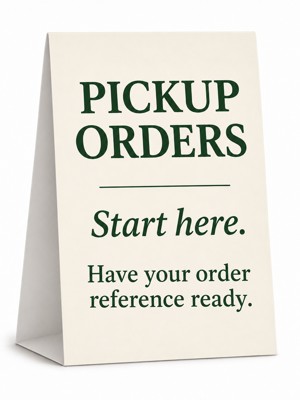
5 × 7-inch custom table tents
The current product page lists 14pt card stock, a glossy default finish and a matte option. Its current minimum is 25; the first displayed price tier of 50 is not the minimum.
If only one desk needs a notice, that minimum may make an existing holder or a simple in-house notice more appropriate. If the format is justified, review the final text at its intended size before ordering. No outdoor or weatherproof suitability is established here.
AI artwork concept based on the listed folded table-tent product type; not a photograph of a manufactured order. Click the image for the actual product page.
Keep the approved proof with the channel map and revision owner. If the pickup desk moves, update the ready message and direction notice before relying on the old print.