“Black Friday” names a campaign period; it does not define the offer. Before printing, compare every claim with the merchant's actual approved rules. Dates, eligible items, purchase conditions and redemption channels need to remain consistent from the information card to the place where the customer uses the offer.

Separate the offer fields instead of relying on a headline
For a concrete platform example, Google Merchant Center's promotion-creation guide treats products, codes, dates, channels, audiences and purchase conditions as separate information. That is documentation for Google's program, not a universal rule for every retailer. It illustrates why a short campaign label cannot establish all the conditions of an offer.
For your own print proof, use the actual merchant-approved record. Have the person responsible for the offer answer unresolved questions rather than letting a designer fill missing conditions with familiar sale language.
Check six parts of the proof
| Part | Question to resolve before printing |
|---|---|
| Dates | What exact start and end, with the applicable time basis, has the merchant approved? |
| Items | Which products or collection qualify, and which do not? |
| Channel | Where can the offer actually be used? |
| Audience and purchase conditions | What approved participation or purchase requirements apply? |
| Redemption | What instruction or code is actually required, if any? |
| Current reference | Who owns the final rules and where can the current approved information be checked? |
Opening hours are a separate fact. A shop may be open beyond an offer's valid window, or a website may accept orders through a different channel. Do not extend the offer's dates or scope simply because the business remains available.
A complete fictional proof correction
Fictional example: Clear Terms has an internally approved campaign for a selected collection, through its store channel, with a membership condition. A proposed information card instead says, “Black Friday savings on everything, everywhere.” The owner holds that proof because it broadens both the eligible products and the redemption channel and omits the condition.
The coordinator compares the draft with the approved campaign record. The selected collection remains distinct from excluded products. The store-only arrangement is not expanded to the website. The membership condition remains visible in the detailed offer information. The date and redemption wording are checked against the same current record; no new discount, gift or code is invented to complete the design.
The owner and counter team review the revised proof together. A general card can point readers to the current approved offer details without claiming to be a coupon. Any card that actually states an offer must retain its material conditions rather than replace them with a vague headline. The final proof is saved with the approved campaign version, while the buyer still checks placement, existing stock and the quantity needed before ordering.
This example completes a wording review. It does not announce a real Clear Terms offer, perform a checkout, establish customer eligibility or claim that any platform has approved a promotion.
Read the proof as a customer would
Compare the headline, nearby explanatory text and current detailed information together. Ask whether a reader could reasonably mistake selected items for all items, a store arrangement for an online offer or a general information card for a redeemable coupon.
Have the responsible merchant resolve the conflict before release. Check that a staff member can explain the same current conditions using the approved information. Keep the earlier proof available internally so a later correction does not leave the team guessing which wording changed.
Keep changing conditions maintainable
If an approved offer changes, review every affected public message and the print stock still waiting to be distributed. A digital update does not automatically change cards already at the counter. Likewise, a new printed card should not point to an outdated information page.
Keep reusable brand information separate from short-lived offer terms when that separation meets the actual need. If there is no approved offer, a store-information notice can remain a service message. There is no need to add a countdown, limited-stock claim or discount percentage.
Choose the physical information point last
Decide where customers will read the information and how much text must remain legible. Use an existing suitable display or replaceable approved notice if it already answers the task. A bulk minimum is a purchasing constraint, not a reason to create an offer or order more than the business can justify.
For an approaching Black Friday campaign, confirm the actual need date, artwork approval and current production and transport arrangement before relying on new stock. No print format or campaign name guarantees arrival before the trading day.
An optional offer-information rack card
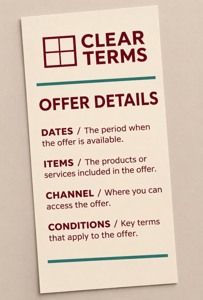
Ordinary printed rack card
The linked rack cards for approved offer information list a 3.74 × 8.27 inch format and 14pt stock as the default. The standard glossy option has a glossy front and uncoated back. The current minimum quantity is 50.
The candidate is printed paper; a holder is a separate requirement. The AI image is an artwork concept, not an actual coupon, eligibility credential or approved merchant promotion. Check the actual configuration, readable proof and full selected order before buying.
Compare custom rack cards only after identifying a useful physical information point. Bring the finished approved wording and a justified print quantity to DecentCustom.
Questions before approving the print file
Can “storewide” replace a selected-product condition?
Use the scope the merchant actually approved. A shorter headline should not broaden eligibility.
Does a general information card act as a coupon?
Only the merchant's actual approved arrangement can establish how an offer is redeemed. Do not imply redemption rights from a generic printed card.
Does a platform's field list establish approval?
No. The cited documentation describes one program's information requirements. It does not confirm your account, offer or printed material has been approved.
Reviewed November 17, 2026. Google documentation is cited as a specific information-structure example, not legal advice or a promise of promotion approval or visibility. Clear Terms is fictional. No actual discount, purchase, customer eligibility decision, checkout result or sales effect is claimed.