Before printing a creative studio guide, compare the selected card with the actual exported artwork. The finished card size, the PDF page boundary and the file someone approved can be three different things.

Settle the guide's job before preparing production artwork
A studio may need a stable overview of its classes, an invitation to a confirmed event or instructions for a particular visit. Those are different documents. Choose the audience and the information owner first. If the proposal is still changing, turn workshop ideas into a reviewable concept before treating it as a print brief.
Write down the selected product, finished width and height, orientation, intended printed sides, stock and finish. Check those details against the actual order configuration. A designer's familiar “rack card” preset is not confirmation that every supplier uses the same dimensions.
For the DecentCustom rack card linked below, the current product page lists 3.74 × 8.27 inches. Confirm the production setup for that selection before exporting. Also confirm who may use the studio's logo, artist images and final copy. A supplier can check a file's construction without knowing whether your class description or artwork permission is correct.
Finished size and PDF boundaries answer different questions
Adobe's page-box guidance distinguishes the TrimBox, the final page size after trimming, from the BleedBox, the area beyond trim used for professional printing. The visible or printable CropBox is another boundary. A PDF looking neatly cropped on screen does not establish that its production setup matches your card.
Ask for the selected product's template or explicit file requirements: finished dimensions, bleed, text-safe area, printed-side arrangement and any required marks. Keep those instructions with the job. Do not copy a bleed value from an unrelated postcard, or assume a decorative border is safely placed because it looks balanced on a large monitor.
Adobe also notes that cropping hides content rather than removing it. Cropping an old layout can conceal text or artwork without correcting the underlying design. Return to the editable source when the chosen format changes, and have the designer check the complete export against the confirmed requirements.
Inspect the file that will actually be submitted
Open the exported file independently of the design application. Check page count and orientation, then compare every public-facing line with the approved copy. Inspect accents, punctuation, line breaks and the relationship between text and the intended trim. View the design at its intended physical size as well as enlarged; a small card should not depend on text that only works when zoomed in.
Fonts deserve a separate check. Adobe's font-embedding explanation describes how permitted embedding helps prevent substitution. If a font is unavailable or restricted, a replacement can look different. Ask the designer to resolve the export according to the font's permissions and the supplier's requirements; do not assume a screenshot or an arbitrary conversion preserves usable text.
Confirm the required file format and color workflow with the supplier. This article does not prescribe a universal PDF preset, image resolution or color profile. A file can have correct dimensions and still contain an out-of-date message, so technical and copy review both remain necessary.
A worked mismatch: a 4 × 9 draft for a 3.74 × 8.27 card
Studio Edition is a fictional creative studio. Its designer starts with an invented 4 × 9 inch draft, then selects the actual 3.74 × 8.27 inch card listed on the linked product page. These rectangles have different proportions.
Width-fit calculation: 3.74 ÷ 4 = 0.935. Scaling the draft uniformly by that factor produces a height of 9 × 0.935 = 8.415 inches, not 8.27 inches.
Decision: hold the export. Obtain the selected card's file requirements and adjust the source layout. Review the text and artwork positions again rather than stretching the design or trimming away the excess automatically.
Unresolved: the supplier's bleed and safe-area settings. The 0.145 inch height difference is a consequence of this example's scaling calculation, not a recommended bleed or trimming allowance.
The revised design may need different line breaks or spacing. After the change, export a new file and repeat the review. An old approval attached to the original 4 × 9 layout does not verify that replacement.
Keep one exact file and a clear status
Separate the editable source, a discussion image and the production export. Give revisions distinct names and retain the earlier versions in the existing project record. A filename containing “final” is not evidence that the file was reviewed.
A useful internal handoff for the fictional example would read:
For a real job, enter the actual reviewers, dates and remaining conditions. When review is complete, state which exact file and configuration were accepted through the agreed order process. If a later change arrives, identify the replacement and establish whether the order can still be changed before assuming an earlier approval covers it.
Use a printed card only for a confirmed information need
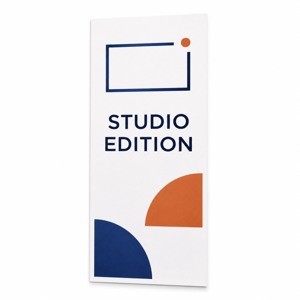
These paper rack cards for a confirmed studio guide list a 3.74 × 8.27 inch format, 14pt standard stock, a default glossy finish and a current minimum of 50. The narrow Studio Edition artwork is an AI concept; a display holder is separate.
Compare custom marketing materials and confirm the actual configuration and file setup with DecentCustom. An accurate existing digital guide or temporary plain-paper version may be sufficient while the content is changing. A successful upload alone does not confirm that the selected design is ready to produce.